
3.1 KiB
Theme
CHADTree does not define it's own theme, outside of some minimal defaults.
All themes are imported from other open source projects.
You can customize themes using the chadtree_settings.theme settings.
chadtree_settings.theme.highlights
Vim comes with some built-in highlight groups, these are used to colour things which I cannot find good imports for.
see :help highlight-groups
chadtree_settings.theme.highlights.ignored
These are used for files that are ignored by user supplied pattern in chadtree_settings.ignore and by version control.
default:
"Comment"
chadtree_settings.theme.highlights.bookmarks
These are used to show bookmarks.
default:
"Title"
chadtree_settings.theme.highlights.quickfix
These are used to notify the number of times a file / folder appears in the quickfix list.
default:
"Label"
chadtree_settings.theme.highlights.version_control
These are used to put a version control status beside each file.
default:
"Comment"
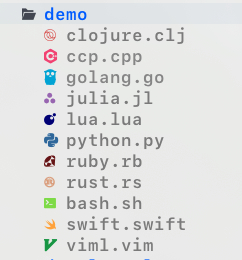
chadtree_settings.theme.icon_glyph_set
To use devicons, you will need supported fonts
devicons:
Imported from vim-devicons

emoji:
Imported from vim-emoji-icon-theme

ascii:

ascii_hollow:

default:
"devicons"
chadtree_settings.theme.text_colour_set
On unix, the command ls can produce coloured results based on the LS_COLORS environmental variable.
CHADTree can pretend it's ls by setting chadtree_settings.theme.text_colour_set to env.
If you are not happy with that, you can choose one of the many others:
legal keys: one of
[
  "env",
  "solarized_dark_256",
  "solarized_dark",
  "solarized_light",
  "solarized_universal",
  "nord",
  "trapdoor",
  "nerdtree_syntax_light",
  "nerdtree_syntax_dark"
]
default:
"env"
chadtree_settings.theme.icon_colour_set
Right now you all the file icons are coloured according to Github colours.
You may also disable colouring if you wish.
github:
legal keys: one of
["github", "none"]
default:
"github"