
Persisted.nvim




Persisted.nvim is a simple lua plugin for working with sessions in Neovim
(Forked from Persistence.nvim)
## :sparkles: Features
- :evergreen_tree: Supports sessions across multiple git branches
- :telescope: Telescope extension to work with saved sessions
- :tickets: Custom events which users can hook into for tighter integration
- :memo: Simple API to save/stop/restore/delete/list the current session(s)
- :open_file_folder: Supports autosaving and autoloading of sessions with allowed/ignored directories
- :floppy_disk: Automatically saves the active session under `.local/share/nvim/sessions` on exiting Neovim
## :zap: Requirements
- Neovim >= 0.8.0
## :package: Installation
Install the plugin with your preferred package manager:
**[Lazy.nvim](https://github.com/folke/lazy.nvim)**
```lua
-- Lua
{
"olimorris/persisted.nvim",
lazy = false, -- make sure the plugin is always loaded at startup
config = true
}
```
> [!NOTE]
> Setting `lazy = true` option may be useful if you use a dashboard
**[Packer](https://github.com/wbthomason/packer.nvim)**
```lua
-- Lua
use({
"olimorris/persisted.nvim",
config = function()
require("persisted").setup()
end,
})
```
**[Vim Plug](https://github.com/junegunn/vim-plug)**
```vim
" Vim Script
Plug 'olimorris/persisted.nvim'
lua << EOF
require("persisted").setup {
-- your configuration comes here
-- or leave it empty to use the default settings
-- refer to the configuration section below
}
EOF
```
If you wish to use session _autoloading_ alongside a dashboard plugin, it is recommended that you give this plugin a greater loading priority. With **Packer** the `after` config option can be used and in **Lazy.nvim**, the `priority` property.
**Telescope extension**
Ensure that the telescope extension is loaded with:
```lua
require("telescope").load_extension("persisted")
```
The layout can then be customised from within Telescope:
```lua
require('telescope').setup({
defaults = {
…
},
extensions = {
persisted = {
layout_config = { width = 0.55, height = 0.55 }
}
}
})
```
## :rocket: Usage
**Commands**
The plugin comes with a number of commands:
- `:SessionToggle` - Determines whether to load, start or stop a session
- `:SessionStart` - Start recording a session. Useful if `autosave = false`
- `:SessionStop` - Stop recording a session
- `:SessionSave` - Save the current session
- `:SessionLoad` - Load the session for the current directory and current branch (if `git_use_branch = true`)
- `:SessionLoadLast` - Load the most recent session
- `:SessionLoadFromFile` - Load a session from a given path
- `:SessionDelete` - Delete the current session
**Telescope extension**
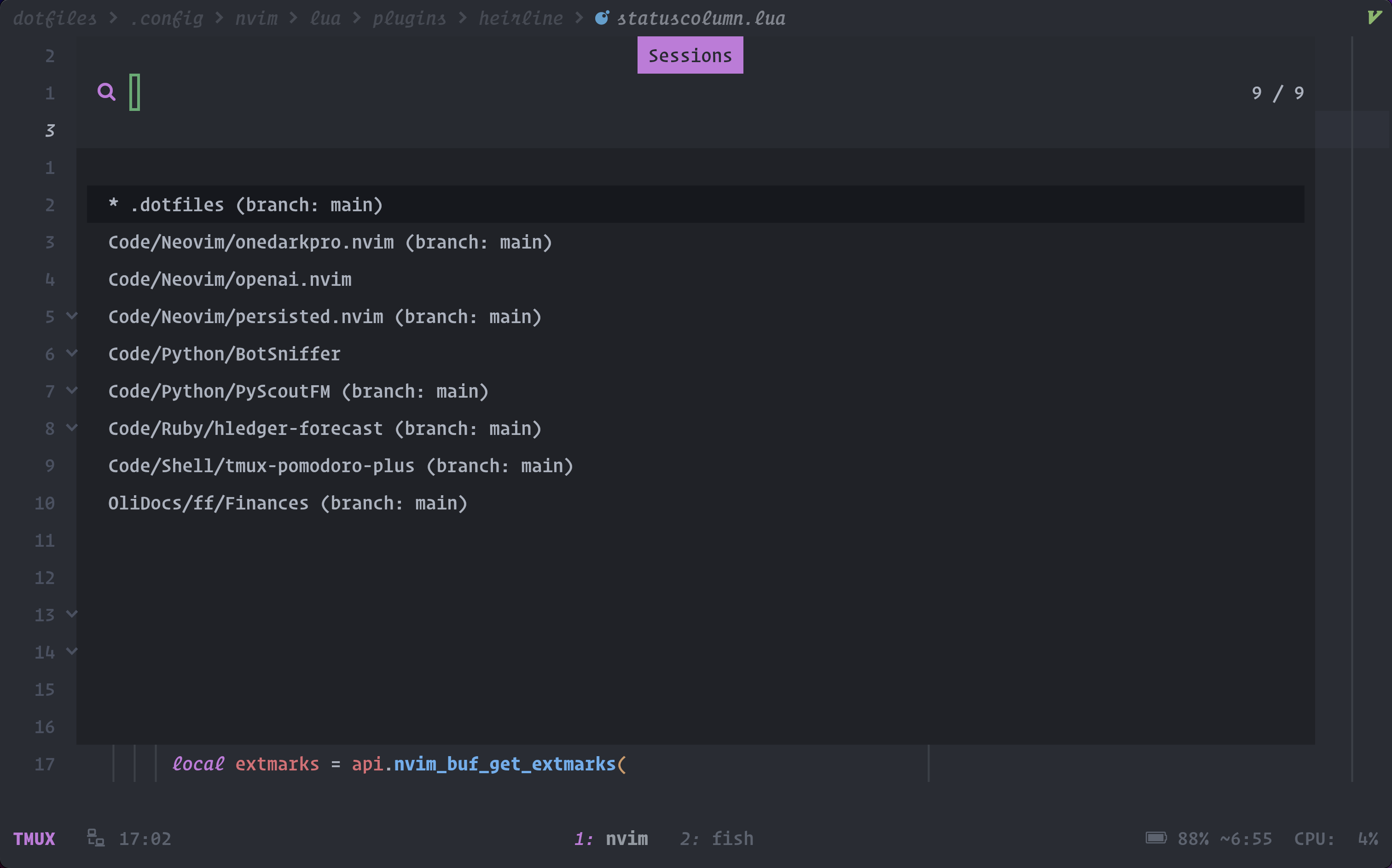
The Telescope extension may be opened via `:Telescope persisted`. The available actions are:
- `` - Open/source the session file
- `` - Add/update the git branch for the session file
- `` - Copy the session file
- `` - Delete the session file
**Global variables**
The plugin sets a number of global variables throughout its lifecycle:
- `vim.g.persisting` - (bool) Determines if the plugin is active for the current session
- `vim.g.persisted_exists` - (bool) Determines if a session exists for the current working directory
- `vim.g.persisted_loaded_session` - (string) The file path to the current session
## :wrench: Configuration
**Defaults**
The plugin comes with the following defaults:
```lua
require("persisted").setup({
log_level = "ERROR", -- One of "TRACE", "DEBUG", "ERROR"
save_dir = vim.fn.expand(vim.fn.stdpath("data") .. "/sessions/"), -- directory where session files are saved
silent = false, -- silent nvim message when sourcing session file
use_git_branch = false, -- create session files based on the branch of a git enabled repository
default_branch = "main", -- the branch to load if a session file is not found for the current branch
autosave = true, -- automatically save session files when exiting Neovim
should_autosave = nil, -- function to determine if a session should be autosaved
autoload = false, -- automatically load the session for the cwd on Neovim startup
on_autoload_no_session = nil, -- function to run when `autoload = true` but there is no session to load
follow_cwd = true, -- change session file name to match current working directory if it changes
allowed_dirs = nil, -- table of dirs that the plugin will auto-save and auto-load from
ignored_dirs = nil, -- table of dirs that are ignored when auto-saving and auto-loading
ignored_branches = nil, -- table of branch patterns that are ignored for auto-saving and auto-loading
telescope = {
reset_prompt = true, -- Reset the Telescope prompt after an action?
mappings = { -- table of mappings for the Telescope extension
change_branch = "",
copy_session = "",
delete_session = "",
},
icons = { -- icons displayed in the picker, set to nil to disable entirely
branch = " ",
dir = " ",
selected = " ",
},
},
})
```
**What is saved in the session?**
As the plugin uses Vim's `:mksession` command then you may change the `vim.o.sessionoptions` value to determine what to write into the session. Please see `:h sessionoptions` for more information.
> [!NOTE]
> The author uses: `vim.o.sessionoptions = "buffers,curdir,folds,tabpages,winpos,winsize"`
**Session save location**
The location of the session files may be changed by altering the `save_dir` configuration option. For example:
```lua
require("persisted").setup({
save_dir = vim.fn.expand(vim.fn.stdpath("data") .. "/sessions/"), -- Resolves to ~/.local/share/nvim/sessions/
})
```
> [!NOTE]
> The plugin may be unable to find existing sessions if the `save_dir` value is changed
**Git branching**
One of the plugin's core features is the ability to have multiple session files for a given project, by using git branches. To enable git branching:
```lua
require("persisted").setup({
use_git_branch = true,
})
```
**Autosaving**
By default, the plugin will automatically save a Neovim session to disk when the `VimLeavePre` event is triggered. Autosaving can be turned off by:
```lua
require("persisted").setup({
autosave = false,
})
```
Autosaving can be further controlled for certain directories by specifying `allowed_dirs` and `ignored_dirs`.
There may be occasions when you do not wish to autosave; perhaps when a dashboard or a certain buftype is present. To control this, a callback function, `should_autosave`, may be used which should return a boolean value.
```lua
require("persisted").setup({
should_autosave = function()
-- do not autosave if the alpha dashboard is the current filetype
if vim.bo.filetype == "alpha" then
return false
end
return true
end,
})
```
Of course, if you wish to manually save the session when autosaving is disabled, the `:SessionSave` command can be used.
> [!NOTE]
> If `autosave = false` then the `should_autosave` callback will not be executed.
**Autoloading**
The plugin can be enabled to automatically load sessions when Neovim is started. Whilst off by default, this can be turned on by:
```lua
require("persisted").setup({
autoload = true,
})
```
You can also provide a function to run when `autoload = true` but there is no session to be loaded:
```lua
require("persisted").setup({
autoload = true,
on_autoload_no_session = function()
vim.notify("No existing session to load.")
end
})
```
Autoloading can be further controlled for certain directories by specifying `allowed_dirs` and `ignored_dirs`.
> [!NOTE]
> Autoloading will not occur if the plugin is lazy loaded or a user opens Neovim with arguments other than a single directory argument. For example: `nvim some_file.rb` will not result in autoloading but `nvim some/existing/path` or `nvim .` will.
**Following current working directory**
There may be a need to change the working directory to quickly access files in other directories without changing the current session's name on save. This behavior can be configured with `follow_cwd = false`.
By default, the session name will match the current working directory:
```lua
require("persisted").setup({
follow_cwd = true,
})
```
> [!NOTE]
> If `follow_cwd = false` the session name is stored upon loading under the global variable `vim.g.persisting_session`. This variable can be manually adjusted if changes to the session name are needed. Alternatively, if `follow_cwd = true` then `vim.g.persisting_session = nil`.
**Allowed directories**
You may specify a table of directories for which the plugin will autosave and/or autoload from. For example:
```lua
require("persisted").setup({
allowed_dirs = {
"~/.dotfiles",
"~/Code",
},
})
```
Specifying `~/Code` will autosave and autoload from that directory as well as all its sub-directories.
> [!NOTE]
> If `allowed_dirs` is left at its default value and `autosave` and/or `autoload` are set to `true`, then the plugin will autoload/autosave from _any_ directory
**Ignored directories**
You may specify a table of directories for which the plugin will **never** autosave and autoload from. For example:
```lua
require("persisted").setup({
ignored_dirs = {
"~/.config",
"~/.local/nvim"
},
})
```
Specifying `~/.config` will prevent any autosaving and autoloading from that directory as well as all its sub-directories.
You can also specify exact directory matches to ignore. In this case, unlike the default behavior which ignores all children of the ignored directory, this will ignore only the specified child. For example:
```lua
require("persisted").setup({
ignored_dirs = {
"~/.config",
"~/.local/nvim",
{ "/", exact = true },
{ "/tmp", exact = true }
},
})
```
In this setup, `~/.config` and `~/.local/nvim` are still going to behave in their default setting (ignoring all listed directory and its children), however `/` and `/tmp` will only ignore those directories exactly.
**Ignored branches**
You may specify a table of patterns that match against branches for which the plugin will **never** autosave and autoload from:
```lua
require("persisted").setup({
ignored_branches = {
"^master",
"feature/%u"
},
})
```
**Events / Callbacks**
The plugin fires events at various points during its lifecycle:
- `PersistedLoadPre` - For _before_ a session is loaded
- `PersistedLoadPost` - For _after_ a session is loaded
- `PersistedTelescopeLoadPre` - For _before_ a session is loaded via Telescope
- `PersistedTelescopeLoadPost` - For _after_ a session is loaded via Telescope
- `PersistedSavePre` - For _before_ a session is saved
- `PersistedSavePost` - For _after_ a session is saved
- `PersistedDeletePre` - For _before_ a session is deleted
- `PersistedDeletePost` - For _after_ a session is deleted
- `PersistedStateChange` - For when a session is _started_ or _stopped_
- `PersistedToggled` - For when a session is toggled
These events can be consumed anywhere within your configuration by utilising the `vim.api.nvim_create_autocmd` function.
A commonly requested example is to use the Telescope extension to load a session, saving the current session before clearing all of the open buffers:
```lua
local group = vim.api.nvim_create_augroup("PersistedHooks", {})
vim.api.nvim_create_autocmd({ "User" }, {
pattern = "PersistedTelescopeLoadPre",
group = group,
callback = function(session)
-- Save the currently loaded session using a global variable
require("persisted").save({ session = vim.g.persisted_loaded_session })
-- Delete all of the open buffers
vim.api.nvim_input(":%bd!")
end,
})
```
**Using callback data**
When certain events are fired, session data is made available for the user to consume, for example:
```lua
{
branch = "main",
dir_path = "Code/Neovim/persisted.nvim",
file_path = "/Users/Oli/.local/share/nvim/sessions/%Users%Oli%Code%Neovim%persisted.nvim@@main.vim",
name = "Code/Neovim/persisted.nvim@@main",
}
```
To consume this data, use the `session.data` table in your autocmd:
```lua
vim.api.nvim_create_autocmd({ "User" }, {
pattern = "PersistedLoadPost",
group = group,
callback = function(session)
print(session.data.branch)
end,
})
```
> [!NOTE]
> This data is available for the `PersistedLoad`, `PersistedDelete` and `PersistedTelescope` events
## :page_with_curl: License
[MIT](https://github.com/olimorris/persisted.nvim/blob/main/LICENSE)